UP-HUD
Winrate Popup
Package for H2N4
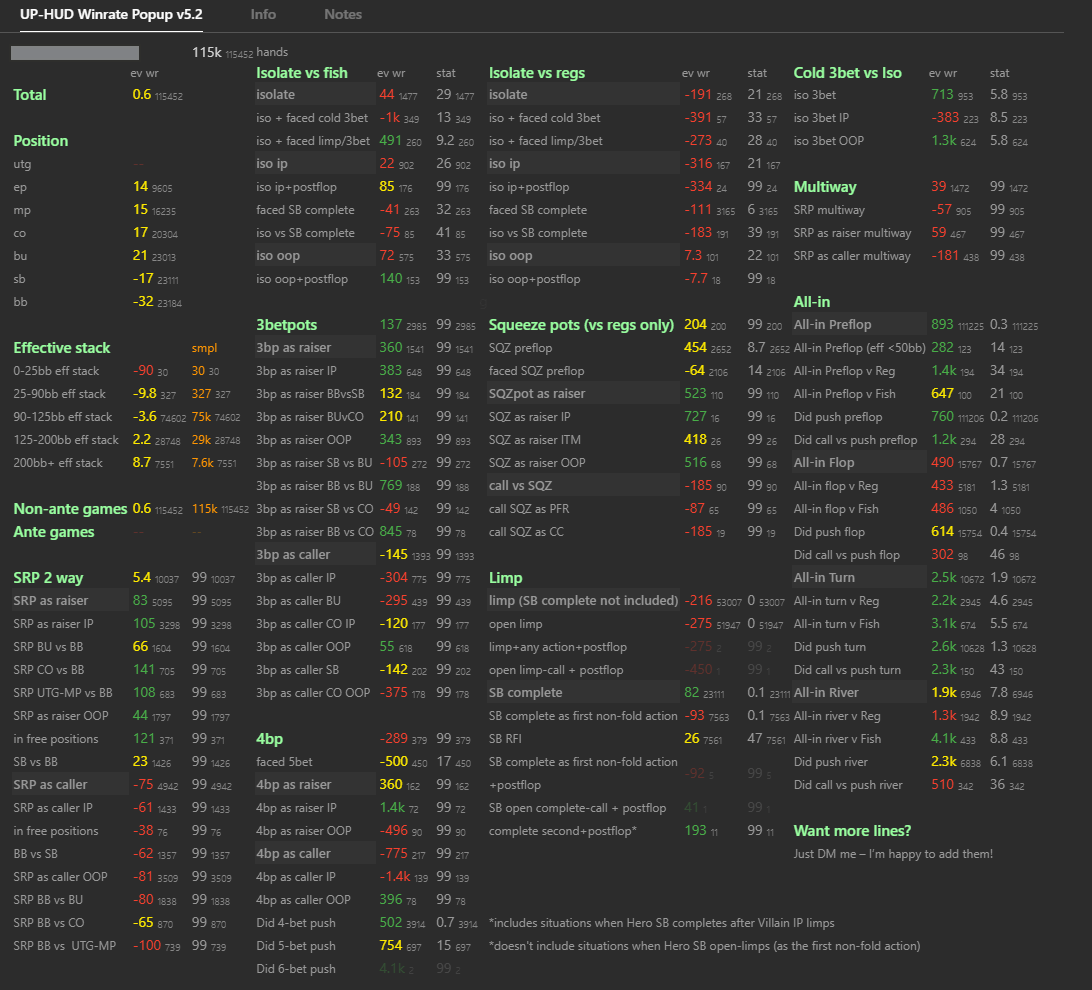
The updated UP-HUD [Winrate Popup] – now even more powerful, informative, user-friendly, and still at the old price of just $50!
This popup is our second most popular product and a favorite tool among regulars from NL100 to mid-stakes to accurately track their game in all key spots, avoid losing EV, and fix leaks before opponents exploit them.
What’s new in version 5.1:
New blocks Limp, Isolate vs Fish, Isolate vs Reg – now covers more rare and expensive spots that previously went unanalyzed.
Each winrate now has stats it is based on – you can open specific hands and break everything down.
Improved winrate calculation formula – winrates are now even more accurate.
Color coding updated to reflect current trends in pools NL200–1000 – view familiar figures and quickly spot deviations.
Suitable for coaches: clearly shows hands forming the winrate, helps build lessons and spot trends in reg vs fish play.
Ideal for self-analysis – in 5 minutes you’ll see where you’re “leaking” EV and what to fix right now.
Don’t overpay for someone else’s database analysis when all the answers are already in front of you – in your own popup.
Play smarter. Work faster. Stay ahead of those still guessing their leaks.
Frequently Asked Questions
What sample size is correct for checking these winrates?
It depends on the specific spot. The rarer the spot, the larger the sample size needed for reliable winrate data. As with any database analysis, we want at least 40k hands.
Here are the general guidelines to follow:
– For SRP (Single Raised Pot): aim for 40–100k hands. At this range, winrates start to stabilize and become useful for analysis.
– For 3-bet and 4-bet pots: variance is higher, so even at 100k hands significant deviations are possible. Interpretation requires caution.
Tip: if the sample is small, pay attention not only to the winrate itself, but also to related stats, actions by street, and texture. This helps compensate for the lack of data.
UP-HUD [Winrate Popup] is not a tool for finding exact figures (because there often isn’t enough data for completely accurate values due to variance), but rather a navigator that helps you identify in which direction to work – where you’re already strong, and where you’re losing EV.
Does this popup show what your winrates should be?
Yes, the popup includes color coding based on our research.
The colors indicate how much your winrate deviates from the average:
Green – your winrate is above average (positive, everything’s great)
Yellow – approximately at the population level (stable, but with potential)
Red – below average (possible leak, worth checking)
However, it’s important to understand: there are no universal winrate norms.
Rake, player pool composition, and playing styles at each limit – all of it matters.
Tip: Build an alias from your pool (e.g., NL100 regs on WPN) and compare yourself to them. That way you’ll get a reference point that truly reflects your own pool – not some abstract “ideal” numbers.
How to correctly create a reg alias for analyzing winrates?
Оптимально — средние регуляры поля (винрейт 0+, дистанция от 10k рук и автометка «Reg»).
Не обязательно ориентироваться на топ регов с винрейтом 8бб/100+, так как часто этот результат достигается за счёт селекта (бамханта) и игры против фишей, а не технического превосходства в стандартных спотах.
При желании можно дополнительно создать алиас регов с винрейтом от 4бб/100, чтобы сравнить их игру в частых спотах (например BU vs BB) и понять, плюсуют ли они за счёт качества игры или за счёт спотов с фишами.
С помощью типов игр можно разделять руки по лимитам и анализировать только регуляров с нужных лимитов. Советую смотреть данные на игроков только со своего лимита (либо добавить игроков с лимита выше, если у вас мало данных).
The optimal choice is average regs in the pool (winrate 0+, sample of at least 10k hands, and auto-marked as “Reg”).
It’s not necessary to focus on the top regs with a winrate of 8bb/100+, as this result is often achieved due to table selection and playing against weaker opponents, rather than technical superiority in standard spots.
Optionally, you can also create an alias for regs with a winrate of 4bb/100+ to compare their performance in common spots (for example SRP BU vs BB) and see if their profit comes from strong play quality or from spots against weaker players.
By using game types, you can separate hands by stake and analyze only regs from the relevant limits. I recommend looking at player data only from your own limit as rake makes its influence on winartes (or adding players from a higher limit if your sample size is too small).
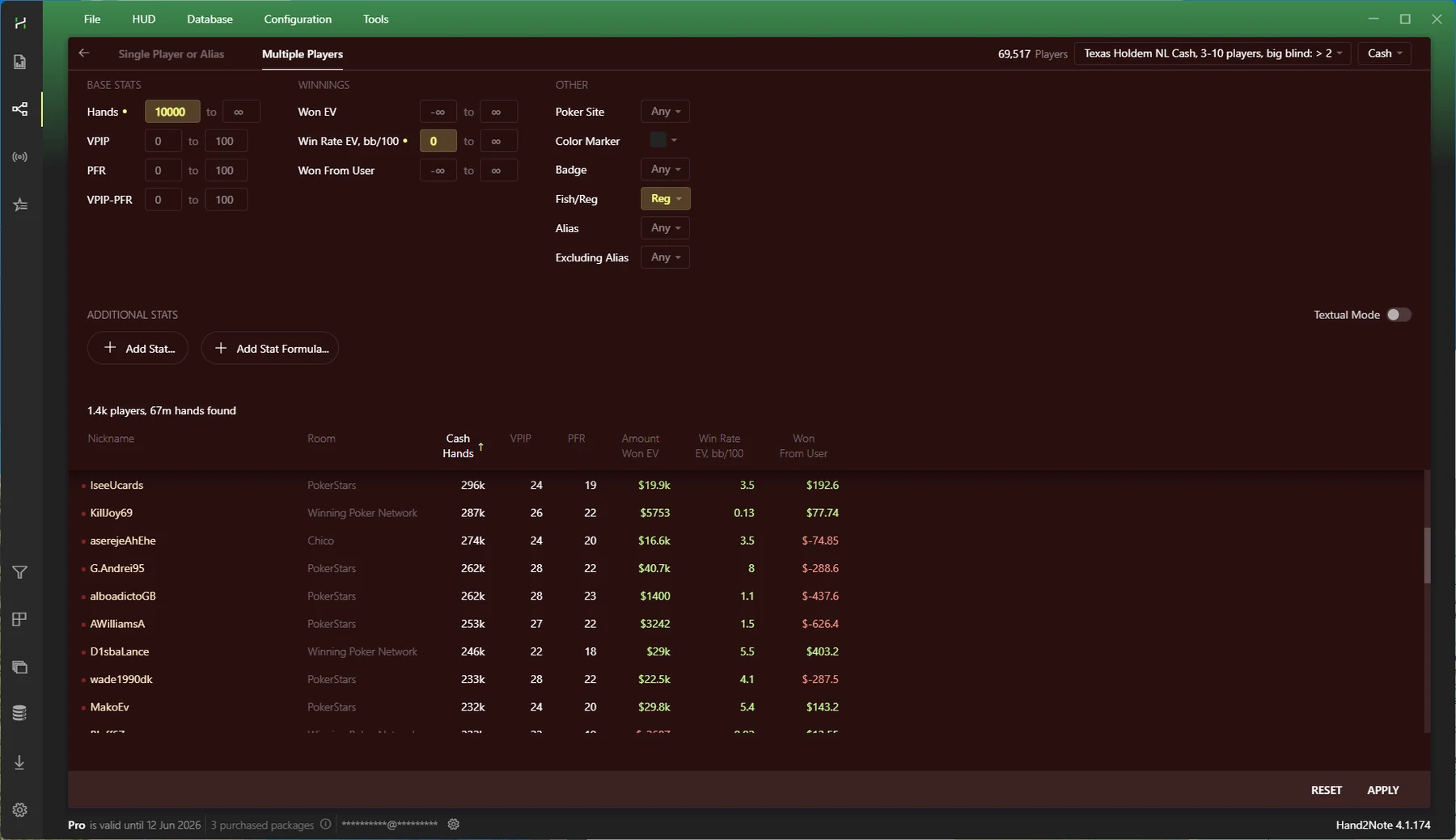
Example of reg alias settings I use for building strategies against the pool
Should you exclude aggressive or passive regs from the analysis?
Attempts to artificially separate overly “aggressive” or “passive” regs often distort the data.
- Sample size decreases — the fewer players included in the alias, the less accurate the final values.
- There’s no universal method to separate regs by style.
- WTSD and WWSF stats alone are not suitable for this task:
- They can only be used in combination with other metrics.
- With samples under 10k hands, their variance is too high to draw reliable conclusions.
What research is the Winrate Popup color coding based on?
The color coding methodology in the popup is based on a database of 70 million hands, played from January 2024 to July 2025 by winning regulars at limits NL200–NL1000 on the biggest global networks: PokerStars, WPN, Chico, and 888.
H2N4 Discount
- 10% off your first H2N subscription: Use this referral link or simply enter the promo code UPHUD at checkout.
- 10% off any renewal or non-first subscription: You can also renew your H2N4.1 subscription through us with a 10% discount – valid for all plans and even during sales.
If you're interested or need help with the process, feel free to reach out to us.
Contacts
Pricing
UP-HUD [Winrate Popup]
- Included in UP-HUD [Range Research]
- Annual license – $50
- after the license expires, the pack will continue to work, but you will stop receiving updates
- License renewal – $20
UP-HUD [Range Research]
- Annual license – $200
- Annual license when purchasing UP-HUD [PRO] for 12 months – $100
- after the license expires, the pack will continue to work, but you will stop receiving updates
- License renewal – $50
UP-HUD [PRO]
- 6-month subscription – $100
- 12-month subscription – $150
- 30-day trial subscription – $30 (Package v1.45)
Please note that we do not offer lifetime licenses, as this allows us to continue releasing updates and providing support in the chat.
UP-HUD [Quantum] Add-on
- 6-month subscription – $90
- 12-month subscription – $140
- Purchase is available only for users who renewed their H2N subscription through us with the –10% discount.
UP-HUD [Bomb Pot]
- Included in UP-HUD [PRO]